Contents
The Brief
The previous post documented building the interactive API demo from a blank file in a single sitting. This one is a step up in scope: take the existing Java Swing reference client and port it into a native Android app — same protocol, same end-to-end encryption, same controller logic — but with a tabbed Material UI, lifecycle-aware fragments, persistent SQLite storage, and background polling that survives the screen turning off.
The goal was not to throw away the desktop implementation. It was to respect it: share as much code as possible with the Swing client, isolate platform-specific concerns, and ship a great product for the Android users.
The Reference: ChatJavaUI
The starting point is an open-source Java Swing client living at github.com/Secchats-tech/ChatJavaUI. Its source tree is small and disciplined:
JClientMain.java— the bootstrap and top-level JFrame.ChatUI.java— the main split-pane layout, menu wiring and global key handlers.UsersView.java— the friends/groups list on the left.ChatView.java— the message panel and composer on the right.Emoji.java— the emoji catalogue and picker.DebugPanel.java— the optional log-tail panel.control/UIController.java— all of the non-UI behaviour: protocol, channels, key exchange, message flow.
The clean separation between ui/ and control/ is the single most
important property of this codebase. Everything below the controller is platform-agnostic:
JSON over HTTP, channel state, cryptographic key derivation, message encoding. None of it
knows about Swing. None of it would need to know about Android.
com.secchat.ui for views, com.secchat.control
for behaviour — is the right axis to preserve. I'll mirror it on Android as
com.secchat.android for the platform-specific layer and reuse the existing
com.secchat.control.UIController contract. The only places I should write
Android-specific code are: (1) the views, which must become Fragments hosted by a
ViewPager-driven Activity; (2) the network client, since HttpURLConnection
must run off the main thread; (3) the local store, which becomes a SQLite implementation
of ILocalDS; (4) background polling, which needs to use AlarmManager rather
than a Swing Timer. Everything else stays.
Architectural Mapping
Before writing a single line, Claude proposed a one-to-one mapping between the two trees. The result is the table below — the Android source on the left, the Swing source it derives from on the right.
| AppSecChat (Android) | ChatJavaUI (Swing reference) | Role |
|---|---|---|
MainActivity |
JClientMain |
Bootstraps the controller, hosts the view container. |
MainPagerAdapter + tabs |
ChatUI (split pane) |
Top-level layout. Mobile prefers tabs over a split pane. |
FriendsFragment |
UsersView |
List of friends and groups, add/remove actions. |
ChatFragment |
ChatView |
Message stream, composer, attachments. |
SettingsFragment |
DebugPanel |
Server URL, logs, diagnostic actions. |
control.UIController |
control.UIController |
Protocol, channels, keys — almost line-for-line identical. |
net.AndroidClient |
JDK HttpClient in desktop |
Off-main-thread HTTP using HttpURLConnection. |
data.AndroidLocalDS |
LocalSQLiteDS (shared lib) |
SQLite-backed ILocalDS implementation. |
PollAlarmReceiver |
javax.swing.Timer |
Wakes the app periodically to fetch new messages. |
The Controller Stays
The single biggest win of the port is that UIController moves over with almost
no edits. It implements the same ChatListener interface as on desktop, holds
the same channel registry, performs the same key-exchange handshake, and emits the same
events. The desktop and Android builds both depend on the same
shared_client.jar, so the protocol implementation is literally byte-for-byte
identical.
shared_client.jar as a Gradle flat-file dependency. Don't reimplement
the protocol classes."
What changed in the Android UIController was only the surface: callbacks dispatch
via Handler(Looper.getMainLooper()) so UI updates always land on the main thread,
and the friends/messages listeners are exposed through small interfaces that fragments
subscribe to in onResume() and tear down in onPause().
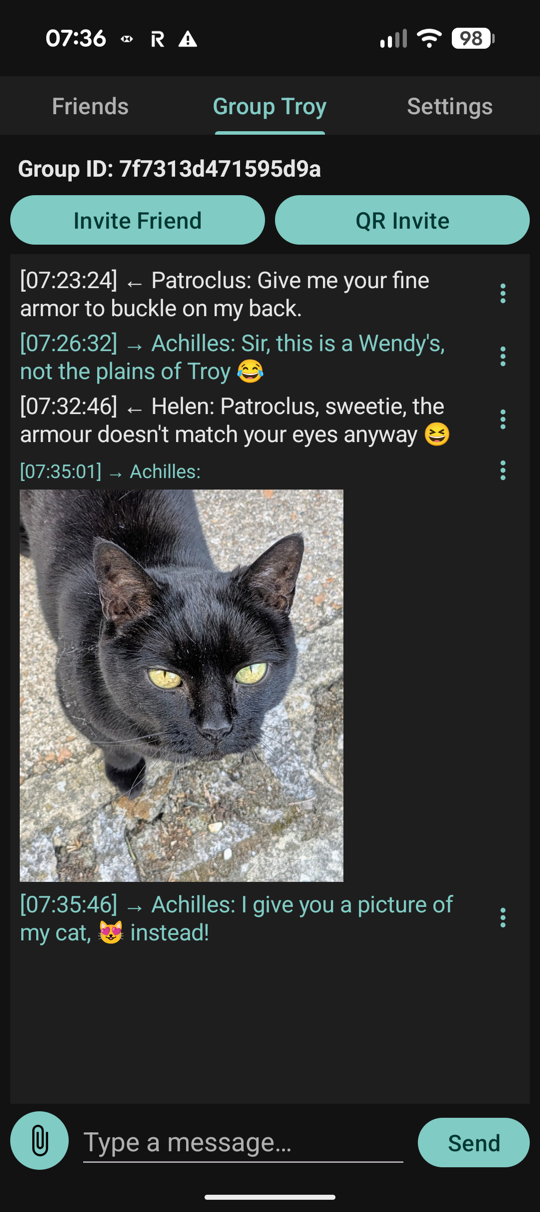
Views Become Fragments
The desktop UI is a single window with a left-right split pane. On a phone, that translates
badly. The Android port uses a ViewPager2 with three tabs — Friends, Chat,
Settings — driven by
ChatUI
as the conceptual ancestor but with a layout idiom appropriate to a 6-inch screen.
ViewPager2 backed by
a FragmentStateAdapter is the canonical pattern. Selecting a friend in the
Friends tab swipes the user to the Chat tab automatically — the same affordance as
clicking a row in UsersView on desktop, but adapted to the touch idiom.
Each fragment subscribes to controller events on resume and unsubscribes on pause, so
rotating the device or backgrounding the app never leaves a dangling listener.
FriendsFragment mirrors
UsersView
row-for-row: pending requests, accepted friends, groups. ChatFragment mirrors
ChatView:
a vertically scrolling RecyclerView of messages, an EditText
composer, an attach button. The emoji catalogue from
Emoji.java
is reused verbatim — it is just a static table.
Networking on Android
The desktop client uses the JDK 21 HttpClient. Android still ships an older
Java baseline and forbids network I/O on the main thread. The port introduces a thin
AndroidClient wrapper around HttpURLConnection that:
- Submits every request to a fixed-size
ExecutorService. - Posts results back to the main thread via
Handler.post(). - Carries the auth token and crypto material identically to the desktop client — same header names, same JSON shape — so the server cannot tell which client it is talking to.
Persisting State with SQLite
The desktop reference uses an embedded SQLite database via JDBC. Android has its own
built-in SQLite stack, so the port supplies a fresh implementation of the
ILocalDS contract — AndroidLocalDS — backed by two
SQLiteOpenHelper instances: one for channels, one for messages.
The schema is preserved exactly: the same column names, the same primary keys, the same indexes. A user migrating from desktop to mobile would see the same data shape on disk.
ILocalDS. Mirroring the desktop schema with two
SQLiteOpenHelper classes is fewer moving parts, easier to debug, and trivial
to port back to the desktop side if a bug is found.
Background Polling
Desktop polling is a one-liner: new Timer(3000, e -> controller.poll()).start().
On Android, that pattern breaks the moment the screen turns off. The port replaces it with
an AlarmManager-driven BroadcastReceiver:
// Wake roughly every 60 seconds, even with the screen off.
AlarmManager am = (AlarmManager) ctx.getSystemService(Context.ALARM_SERVICE);
PendingIntent pi = PendingIntent.getBroadcast(ctx, 0,
        new Intent(ctx, PollAlarmReceiver.class),
        PendingIntent.FLAG_UPDATE_CURRENT | PendingIntent.FLAG_IMMUTABLE);
am.setInexactRepeating(AlarmManager.ELAPSED_REALTIME_WAKEUP,
        SystemClock.elapsedRealtime() + 60_000,
        AlarmManager.INTERVAL_FIFTEEN_MINUTES, pi);
When the receiver fires, it acquires a WakeLock, asks the controller to fetch
pending messages, and posts a notification if anything arrived. The desktop's hot loop is
fine on a plugged-in laptop; on a battery-powered phone the right behaviour is to wake
rarely, do a small amount of work, and go back to sleep.
From Code to Play Store
Vibe coding does not end at the source tree. Shipping the app demanded a launcher icon, a 1024 × 500 feature graphic, a privacy-friendly screenshot, signing config, a target-SDK bump to 36, and an internal-testing release on the Play Console. Each of these was a one-prompt task:
- Generate a 512 × 512 PNG launcher icon from the existing logo.
- Compose a 1024 × 500 feature graphic with brand-consistent copy.
- Wire
signingConfigsto read fromkeystore.properties. - Bump
compileSdkandtargetSdkto 36. - Increment
versionCodefor each new internal release.
No part of this work involved Claude searching for documentation. It already knew the
Play Console's asset specs, the Gradle DSL for signing configs, and the
R.mipmap naming conventions. The user described the outcome; Claude produced
a buildable APK.
What Changes at Project Scale
The previous post was a single file. This one is a 25-class Android project sharing a JAR with a desktop client and shipping to a real app store. The interesting observation: the vibe-coding rhythm did not change.
The prompts stayed at the level of intent. The artifacts grew from a webpage to a signed Android binary. The friction stayed flat.
What scales here is not the LLM's typing speed — it is its ability to hold the whole
project in working memory. When the user said "reuse shared_client.jar",
Claude already knew which classes that jar exposes, which were extended on the desktop
side, and which would need fresh Android implementations. When the user said "tabs not
split pane", Claude already knew that the friend-selection event in
UsersView
was the natural trigger for switching the active tab on Android.
The reference implementation lives at github.com/Secchats-tech/ChatJavaUI. The Android port lives on the Play Store. Both speak the same wire protocol and answer the same open API. Both were shaped one sentence at a time.
Java Swing reference implementation: github.com/Secchats-tech/ChatJavaUI/tree/main/src.